
Detecting Hardcoded Strings in Laravel, Blade, and React
One of the most requested features for Laravel Translations Pro was hardcoded string detection. Developers know they should use translation keys everywhere, but in practice, strings like "Welcome back" and "Save changes" end up hardcoded all over the codebase.
I built a scanner that finds them automatically.
The Problem
In a multilingual app, every user-facing string should go through the translation system:
But in a real codebase with thousands of files, finding every hardcoded string manually is impossible. You need automation.
Multi-Language Scanning
The challenge is that hardcoded strings look different in every file type:
Blade templates:
PHP controllers:
React components:
Vue components:
Each file type needs its own scanner that understands the syntax and can distinguish user-facing strings from technical code.
The Scanner Architecture
I built a dedicated scanner for each file type:
Each scanner returns a collection of detected strings with their location:
The HardcodedDetectionManager orchestrates the scanners:
Reducing False Positives
The hardest part isn't finding strings — it's ignoring the ones that aren't user-facing. Without filtering, the scanner would flag:
- CSS class names:
"flex items-center" - Route names:
"products.index" - Database columns:
"created_at" - Configuration keys:
"app.name" - Log messages:
"Payment processed successfully"
Each scanner has context-aware filters:
Blade scanner filters:
- Ignore strings inside
@class,@style, and attribute directives - Ignore strings that look like CSS classes
- Ignore Alpine.js expressions (
x-data,x-on)
React scanner filters:
- Ignore
classNameprop values - Ignore import paths
- Ignore object keys and technical identifiers
PHP scanner filters:
- Ignore array keys
- Ignore route names and config keys
- Ignore log channel messages
The goal is to flag strings that are very likely user-facing and let developers decide on edge cases.
The Conversion Flow
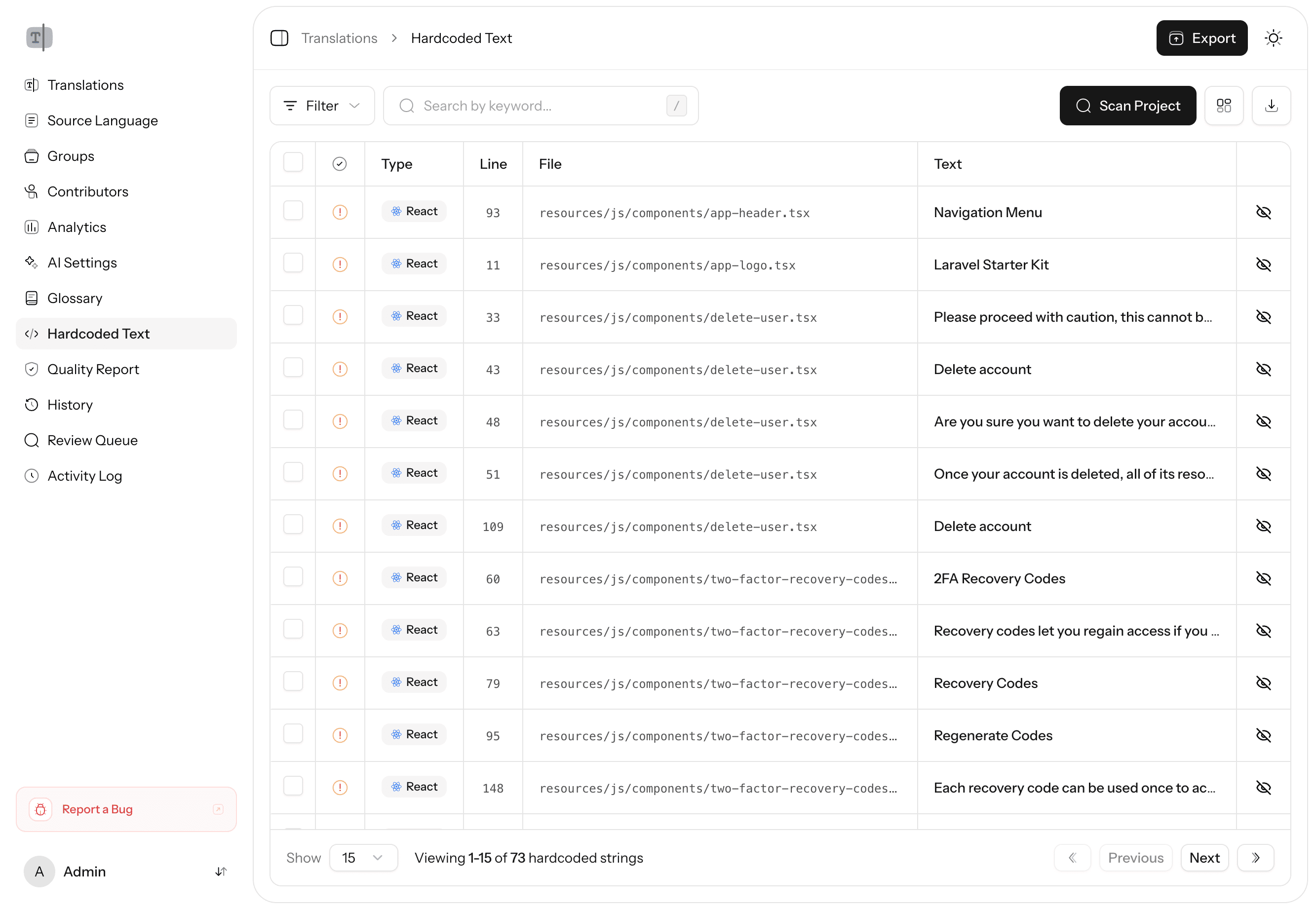
When a hardcoded string is detected, the user can convert it to a translation key directly from the UI:
- View detected strings — Grouped by file, with line numbers and context
- Select strings to convert — Pick individual strings or bulk select
- Generate translation keys — The system suggests a key based on context (e.g.,
profile.save_changes) - Apply changes — The scanner replaces the hardcoded string with the translation function
For a Blade file, this means replacing:
With:
And adding the key to your translation files.
Ignoring Strings and Files
Not every detected string needs to be translated. Third-party code, test fixtures, and intentionally English-only strings can be ignored:
- Per-string ignoring — Mark individual strings as "not translatable"
- Per-file ignoring — Exclude entire files or directories (useful for vendor code)
Ignored strings won't show up in future scans, keeping the results clean and actionable.
Batch Processing
Large codebases can have thousands of files. Scanning them synchronously would time out. The scanner runs as a queued job:
It processes files in batches, stores results in the database, and the Pro UI shows a progress indicator while scanning is in progress.
Results
After running the scanner on a medium-sized Laravel application (~200 files), it typically finds:
- 50-150 hardcoded strings in Blade templates
- 10-30 in PHP controllers and services
- 20-50 in React/Vue components
Converting even half of these immediately improves the application's internationalization readiness. The scanner turns a multi-day audit into a 30-minute task. Combined with AI-powered translation, you can go from zero internationalization to full multilingual support in an afternoon.